Everything you copied,
one shortcut away.
Windy is a small, quiet clipboard history. Press a shortcut, search, press Enter. It stays on your device and, by design, never phones home (based on code review).
Download Free and open source
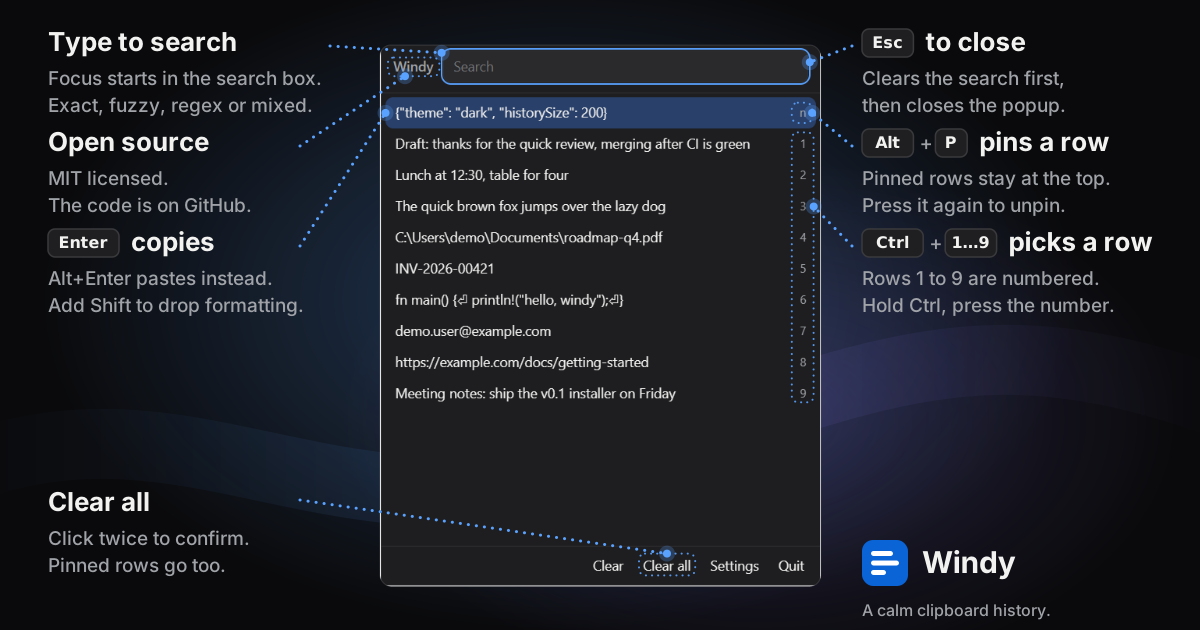
Try it right here
This is the real layout. Type to search, use ↑ ↓, press Enter to copy, Alt+P to pin.
Fast
Opens in about 20 ms on our test machine with an empty history, and searches as you type. Speed with a full history has not been measured yet.
Private
Everything is stored locally. On Windows, copies that password managers mark as sensitive are skipped and you can ignore chosen apps. Neither is implemented on macOS or Linux yet.
Native feel
Follows your system's light or dark setting (checked in dark mode only so far). The accent colour is fixed, not taken from your system.
Open source
MIT licensed. Inspired by the Mac app Maccy, written independently.
Download
Pick your system.
File names never contain a version, so these links always give you the latest release. Checksums are listed on the release page.
Questions
Does Windy send my clipboard anywhere?
By design, no. History lives in a local database on your device, and Windy's own code makes no network requests. That is based on code review, not a packet capture, and the system webview that draws the windows is a separate component.
Will it record my passwords?
On Windows, Windy skips copies that password managers mark as sensitive, and you can ignore chosen apps in Settings. Both are Windows-only in v0.1 and not yet implemented on macOS or Linux, where a copied password can be recorded. You can also add ignore patterns in Settings.
Is it the same as Maccy?
No. Maccy is a macOS app. Windy follows the same simple behaviour but is a separate project that runs on Windows, macOS and Linux.
Does it work on Linux Wayland?
Not natively yet. Linux support in v0.1 is X11, including XWayland on Wayland desktops. Native Wayland is a known limitation of this version, so clipboard history, global shortcuts and popup placement on Wayland sessions may not work. The Linux build has not yet been run on real hardware, so treat Linux as unverified. Details are in the project README.
The installer says the publisher is unknown.
Early builds are not code-signed, so Windows SmartScreen and macOS Gatekeeper warn you. The source and checksums are public so you can verify what you run.
How much does it cost?
Nothing. It is MIT licensed.
Contact
Questions, bugs and ideas are welcome on GitHub Issues. Security reports: see the security policy.